Free trial
Find your creative flow.
$0 to get started
Try the studio before choosing your plan.
- Screen and camera recording
- Explore the editing timeline
- Try Motion Studio
- 5 free exports
Create engaging tutorials with professional screen recording. Camera tracking, background removal, and custom cursors — designed for educators and content creators.
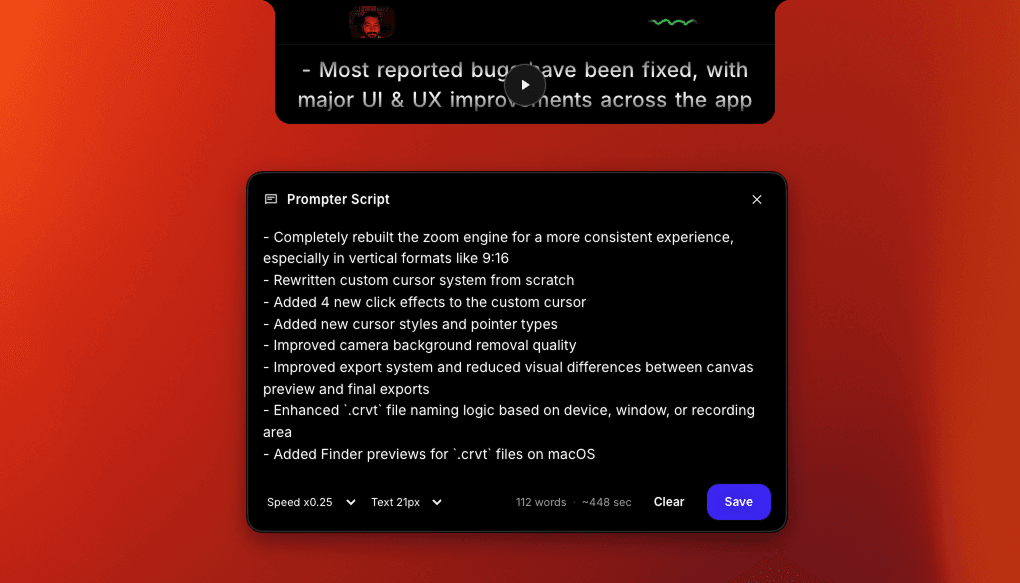
Every feature designed to make your tutorials clear, engaging, and professional.
Your webcam overlay follows your cursor automatically, keeping the presenter near the action at all times.
Remove your camera background in the editor after recording. No green screen needed for a clean, professional result.
Make your cursor larger, change colors, and add click effects so students can follow every action.
Automatic zoom follows your clicks and movements, making small UI details clear and readable.
Trim mistakes, split segments, and reorder content with frame-level precision. No separate editor needed.
Add animated GIFs, images, and video overlays to highlight key moments and keep students engaged.
Smoothly zoom the screen toward important UI so viewers follow the story—without jumpy cuts or a separate motion tool. Editable zoom keeps attention on what matters after capture, so tutorials, demos, and launch videos read clearly on a single macOS timeline—no round-trip to another editor for pacing.
Make pointer movement and clicks easy to read on screen captures—ideal for product demos and engineering walkthroughs. Highlight the cursor for training and sales recordings; clearer click feedback means you spend less narration repeating where to look on the interface.
Remove the webcam background in the editor after capture for a clean talking-head cutout on macOS. Creavit Studio skips gimmicky real-time virtual backgrounds while you record. When you are done, strip the backdrop from the camera clip in-editor and ship a crisp subject silhouette in the final export.
Resize and position the webcam against the screen so the layout matches demos, tutorials, or talking-head moments. Switch layout presets and balance camera size with screen real estate—one coherent frame for onboarding clips, changelog videos, and creator content without leaving the recorder.
Add depth and editorial framing so flat UI captures feel closer to polished product marketing—not a raw screen grab. Perspective-style framing helps interface storytelling read intentional: viewers track hierarchy faster, which matters for SaaS launches, changelog videos, and investor-ready demos.
Drop titles, callouts, and code context next to the interface for tutorials, walkthroughs, and product explainers. Deliver context when viewers need it—not after they are lost. Layer readable emphasis for developer content so narration, cursor, and text reinforce the same beat.
Stack graphics, short clips, and supporting visuals wherever the edit needs them—without a separate compositing app. Bring reactions, logos, and motion layers into frame while keeping the screen readable. The result feels closer to branded product video than a flat capture.
Present the recording inside device frames and presentation-ready compositions for social posts and documentation. Wrap the timeline in a consistent mockup language for social and docs so every ship keeps the same professional line—from capture through export on macOS.
Design animated titles, shapes, images, and video clips on a dedicated motion canvas, then bring them into your screen recordings. Build polished animated sequences with layers, transform controls, timelines, and reusable motion templates—without leaving the Creavit Studio workflow.
Start for free. Pay monthly, save with a year, or make it yours for life.
One app for recording, editing, motion, and AI.
Find your creative flow.
Try the studio before choosing your plan.
Monthly Plan
Billed monthly. Cancel anytime.
Best value. Pay yearly and save.
Works out to $4.16/month, billed yearly. Cancel anytime.
Lifetime Plan
One-time payment. Lifetime access, no subscription.
One license. Up to five Macs. 14-day money-back guarantee.
Join thousands of educators and content creators who use Creavit Studio to create engaging tutorials that teach and inspire.
Common questions about recording tutorials on Mac.
Creavit Studio combines screen recording with camera tracking, auto zoom, custom cursors, and a built-in editor. You can record, edit, and export tutorials without switching apps.
Yes. Record your screen with a webcam overlay that includes AI background removal. Your camera can follow the cursor to stay near the action.
No. After capture, Creavit Studio removes the background from your camera clip in the editor, so you can keep a clean cutout without a green screen.
Export in H.264 or H.265 at up to 4K. Optimized for YouTube, Udemy, Skillshare, Teachable, and any platform that accepts MP4.
Yes. Download and try all features free. No credit card required for the trial.