Two Different Things Called "AI Video"
Most tools described as AI video editors generate footage from a prompt, or apply a model to footage you already have — silence removal, captions, reframing. The output is a new file, and if it is wrong you prompt again.
There is a second, less common shape: an agent that operates the editor you already use. It does not generate video. It issues the same commands your clicks would issue, in the same project, with the same undo history. When it gets something wrong, you fix it the way you would fix your own mistake — by dragging the thing it placed badly.
This guide is about the second kind, which is what Creavit Studio exposes on macOS: an Agent panel inside the app and an open MCP server for your own terminal.
What "Drives the Real Editor" Actually Means
The distinction sounds academic until something goes wrong.
If an agent generates a finished video, the only correction available is another generation. If an agent adds a zoom segment at 00:12, that zoom is an object on your timeline. You can move it, retime it, change its target or delete it — and so can the agent, on the next instruction, because it is reading the same project state you are looking at.
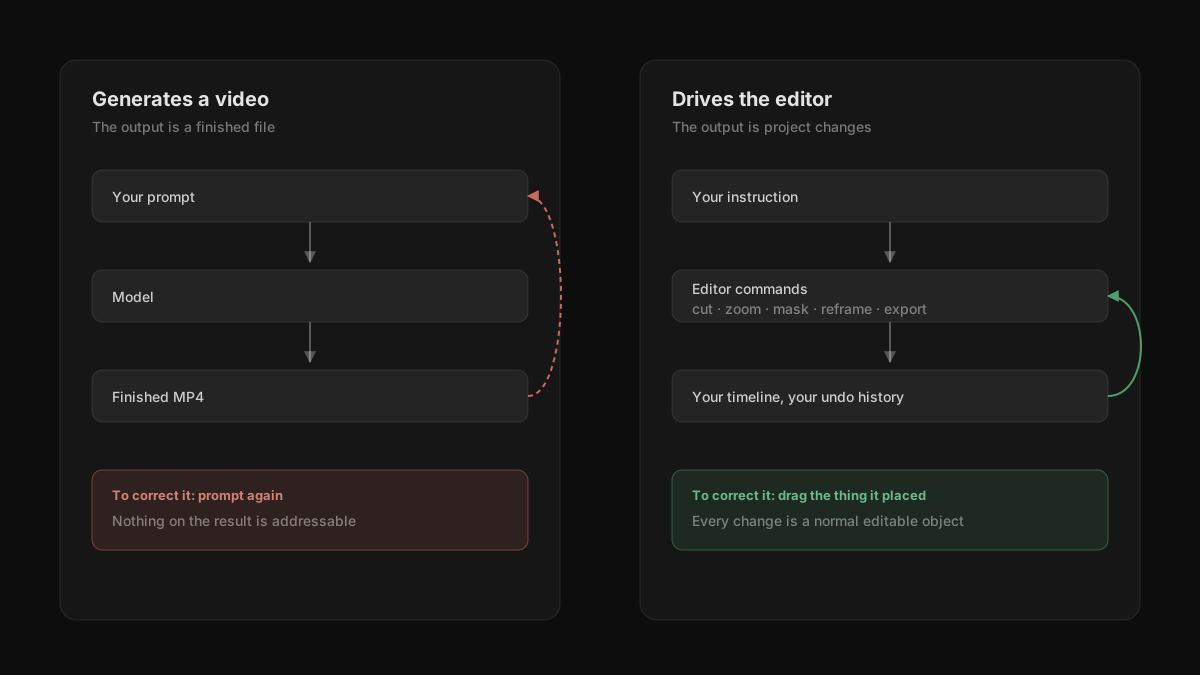
That also means the agent's work is reviewable. You can see which commands ran, in order, before you export anything. A tool trace showing "cut 3 segments, added a privacy mask, started export" is a different kind of artifact than a finished MP4 that appeared from a prompt.
The Two Ways In
Inside the app. An Agent column sits next to Export. It runs the Claude Code or Codex CLI already installed on your Mac — there is no separate account, and the recordings stay on the machine. If you already have one of those CLIs set up, the panel uses it.
From your terminal. The app ships an MCP server, so any MCP client can drive it. One command wires it up:
claude mcp add creavit-studio -- npx -y creavit-studio-mcpCodex uses ~/.codex/config.toml instead:
[mcp_servers.creavit-studio]
command = "npx"
args = ["-y", "creavit-studio-mcp"]
Both surfaces reach the same commands. The panel is convenient when you are already in the app; the terminal is better when the recording is one step in something larger — a release script, a docs build, a batch of clips.
What It Is Genuinely Good At
Recording something repetitive
The strongest case is not editing at all — it is capture. Recording a website walkthrough by hand means opening the page, waiting for it to settle, clicking in the right order, and stopping cleanly, with your own hesitation baked into the timing. An agent runs the same steps at a consistent pace, in a window opened at the aspect ratio you asked for.
"Open creavit.studio, open License Manager, record it in 9:16 and export."
This matters more than it sounds for anything you re-record often. A walkthrough that has to be refreshed every release is a chore by hand and a single instruction when scripted.
Passes over the timeline
Repetitive editing decisions are a good fit: removing silent gaps, masking a region for the rest of a clip, adding a zoom on every click in one window, reframing to a second aspect ratio. These are decisions with clear rules, which is exactly where delegating works.
Doing three things in one instruction
Because the agent has access to recording, editing and export, a request can span all three:
"Cut the silent parts, blur the API key at 00:12 and export it in 4K."
Each step lands as a real project change, so you can inspect the result before the export finishes.
Where It Still Needs You
Taste. An agent can add a zoom at every click. Whether the video wants a zoom at every click is a judgement about pacing, and it will not make it for you. Expect to delete some of what it adds.
Narration. It knows where you clicked. It does not know that you clicked a button and then talked for eight seconds about the panel that opened. Timing that follows your voice is still a manual pass.
Knowing what the video is for. "Make this better" produces motion, not improvement. Instructions that specify an outcome — a length, an aspect ratio, a thing to emphasise — work; instructions that outsource the goal do not.
Anything irreversible. Export is cheap to redo. Recording over a take is not. Be more specific when the instruction touches capture than when it touches the timeline.
A Realistic First Session
- Record something normally, by hand, so there is a real project open.
- Ask for one narrow thing: *"Remove the silent gaps longer than a second."*
- Look at what changed on the timeline before doing anything else.
- Ask for a second pass: *"Add a zoom on each click inside the terminal window."*
- Delete the two or three zooms that do not serve the pacing.
- Export.
The point of starting narrow is calibration. You learn quickly which instructions land cleanly and which need you to be specific, and that is worth more than a first attempt at a whole video.
Common Mistakes
Asking for the whole video in one instruction. It will do something. Reviewing it is then harder than doing the work.
Not looking at the tool trace. The list of commands is the cheapest review available, and it is right there before you export.
Treating it as a replacement for knowing the editor. The agent uses the same commands you would. If you do not know what a zoom segment or a sensitive area is, you cannot judge whether it used them well.
Forgetting it can record. Most people use it only for editing and keep recording by hand. Capture is often where it saves the most time.
Frequently Asked Questions
Does my footage get uploaded anywhere?
No. The panel runs a CLI on your Mac, and the MCP server is local. Recording, editing and export happen on the machine.
Do I need a separate AI subscription?
The in-app panel uses the Claude Code or Codex CLI you have already installed, so whatever account those use is the account in play. There is no additional service to sign up for.
Can I use it from an editor other than the built-in panel?
Yes. The MCP server is client-agnostic — any MCP client can connect to it. The in-app panel specifically detects Claude Code and Codex.
Can it export in more than one aspect ratio?
Yes. Reframing and export are ordinary commands, so producing a 16:9 and a 9:16 cut from one recording is a single request.
What happens if it does something wrong?
It lands in your project's undo history like any other change, because it used the same commands you would have.
Worth Trying If
You record the same kind of thing repeatedly — release walkthroughs, onboarding clips, demo refreshes — and the repetition is the expensive part. That is where an agent driving a real editor earns its place, and it is a different proposition from a tool that generates a video and hands it to you.
Related Reading
- All-in-One Video Creation Suite for Mac — why recording and editing living together is what makes this possible
- Screen Recorders with Auto Zoom for Mac — the zoom segments an agent adds and removes
- How to Hide Sensitive Information in a Screen Recording — the masking step you can delegate